

Showing posts with label web. Show all posts
Showing posts with label web. Show all posts
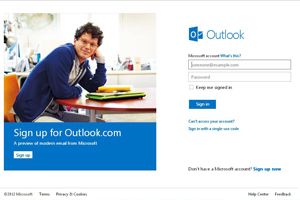
Oulook.com is modified version of Hotmail.It is made more user friendly and more features are added to it.At present all Hotmail / Live user can login to outlook.com and can continue to send or receive there messages from @hotmail.com or @live.com.User can also upgrade the account and use same username/password to login.All their information like mails,contacts,calendar will still be available in the new account.Company is also planning to upgrade all the account in future.
Outlook email service by Microsoft includes virtually unlimited storage and integrate the video chat service "Skype" that Microsoft bought last year.This will enhance the user experience for video chat.
User also have the option to integrate with Facebook.com and Twitter.com.You can easily get your friend in outlook from Facebook or Twitter.This option is not provided by Gmail.
Unlike Hotmail,the new service will have lesser or no advertisement.As company is saying there would not be display advertisements.People who use Hotmail were complaining about banner advertisement as those were annoying people.If this is true than it could be a great email service.

Firefox browser looks better than IE .It loads faster than IE and have many plugins (add-ons) that enhance its functionality (Though IE also added some extra functionality in its 9 and later version) .
I am also using Firefox for surfing internet.From last few days I was getting some problem while using it.
My Firefox keeps on loading the page.Even welcome page was taking a long time to load.A circle in the tabs keeps on moving which shows that page is still loading.
Sometimes circle keeps on moving and i have to open a new blank tab.I was completely annoyed with this.I searched Mozilla forums and found this solution:-
1) Type about:config in the address bar and press the "Enter" key.
2) When you see a warning, click I'll be careful, I promise! button.
3) In the Filter bar, type network.http.max-connections
4) Right click the preference network.http.max-connections and choose Modify change the value to 30 or 48 click OK. (default value is 256)
5) Close the about:config tab and Restart Firefox.
Another alternate solution for this problem is to disable the extra addons and plugins that you have installed.
Follow these steps to remove/disable addons or plugins:-
1) Go to Add-ons Manager by clicking Add-ons from Tools menu.Alternatively you can use command ctrl+shift+A
2) Click on Disable button to disable the add-ons.You can uninstall these add-ons by clicking on Remove button.
3)You can also remove/disable extra plugins by selecting plugins from right sidebar.
After removing the extra add-ons/plugins , restart the Firefox.
Hope this solution will help you.If you have face same problem or still facing problem than please share it in comments
Gmail is the email service provided by Google.it was reported down few day before by a number of people.Google team invested the matter and sort out the problem.This service outage cause trouble for many people.If you are one of those people who suffered this service outage than you can easily overcome from this kind of problem next time by following the simple steps.You can also quickly access you gmail inbox by using these tips.:-
1) Try loading Gmail in simple HTML mode:-
Standard view of Gmail takes a lot time to load.You can switch to simple HTML mode of gmail.It loads faster and may help you in downtime.
2) Use Mobile Version of Gmail from your desktop:
Mobile version of any site loads faster.Same is the case with Gmail.You can access the mobile version of Gmail directly from your desktop by clicking here.
3) Using Safe mode:-
Another option is to go for safe mode.If you are a tech geek and are using gmail lab features than you might have observed that some of these features conflict with each other.You can disable these features and use safe mode of Gmail by clicking here.
4) Use iGoogle Gadget :-

You can add iGoogle gadget to get the email.It is a small version of Google's free Mail system, which previews your inbox.You can easily add it from here.
5) Get Gmail's Offline Access :-
Now you can get access to Gmail while you are offline.Though this method is not 100% perfect as it doesn't store all of your inbox emails but still you can get access to most of your emails while you are offline or gmail is down.
You can use these steps not only when gmail is down but also when you want faster access to gmail or your internet connection is slow. These steps helps to load your gmail account faster and you get quick access to your inbox.
1) Try loading Gmail in simple HTML mode:-
Standard view of Gmail takes a lot time to load.You can switch to simple HTML mode of gmail.It loads faster and may help you in downtime.
2) Use Mobile Version of Gmail from your desktop:
Mobile version of any site loads faster.Same is the case with Gmail.You can access the mobile version of Gmail directly from your desktop by clicking here.
3) Using Safe mode:-
Another option is to go for safe mode.If you are a tech geek and are using gmail lab features than you might have observed that some of these features conflict with each other.You can disable these features and use safe mode of Gmail by clicking here.
4) Use iGoogle Gadget :-
You can add iGoogle gadget to get the email.It is a small version of Google's free Mail system, which previews your inbox.You can easily add it from here.
5) Get Gmail's Offline Access :-
Now you can get access to Gmail while you are offline.Though this method is not 100% perfect as it doesn't store all of your inbox emails but still you can get access to most of your emails while you are offline or gmail is down.
You can use these steps not only when gmail is down but also when you want faster access to gmail or your internet connection is slow. These steps helps to load your gmail account faster and you get quick access to your inbox.
Soon after providing the new layout for the blogger administration,now Google has introduced two new widget for Blogspot users.Both widget help user to add the Google's social networking to their blog.
First widget helps to add plus one button to blog while second widget allow users to connect their blog with Google Plus page.If you have not created a Google Plus page than I have written a article on How to create Google Plus Page.This article will guide you to create a Google Plus page to promote your brand, product or website.
Once you have create brand new Google plus page,than you can easily integrate it with your blog using badge. To add a Plus Page badge on blogspot blog ,click on Layout and than add a gadget.There you will see a screen like the image shown below:-

From here select Google+ Badge.There you need to enter a Google+ Profile or Page ID which you can get from your profile link or page link.Add it and than save it.That's all...You are done.Google Badge of your profile or page of Google Plus will be shown on your blog.Similarly you can add +1 button to your blog.
This button will allow users to share it with their friends, contacts, or the rest of the web. +1s from your readers will appear to people in their circles whenever your blog shows up in Google search results.Add these two Gadgets but don't forget to +1 this article ;-)
First widget helps to add plus one button to blog while second widget allow users to connect their blog with Google Plus page.If you have not created a Google Plus page than I have written a article on How to create Google Plus Page.This article will guide you to create a Google Plus page to promote your brand, product or website.
Once you have create brand new Google plus page,than you can easily integrate it with your blog using badge. To add a Plus Page badge on blogspot blog ,click on Layout and than add a gadget.There you will see a screen like the image shown below:-

From here select Google+ Badge.There you need to enter a Google+ Profile or Page ID which you can get from your profile link or page link.Add it and than save it.That's all...You are done.Google Badge of your profile or page of Google Plus will be shown on your blog.Similarly you can add +1 button to your blog.
This button will allow users to share it with their friends, contacts, or the rest of the web. +1s from your readers will appear to people in their circles whenever your blog shows up in Google search results.Add these two Gadgets but don't forget to +1 this article ;-)
Google + is the social networking site by Google.Just like its competitor Facebook, now Google + offers you to create a page.You can create a Fanpage on Google plus just like we do in Facebook.
We already have fan page on Facebook where you can like us.Now Information Ground is on Google + also.
You can simply plus one on the Google plus page in the same way as you like on the Facebook.It will increase the search engine visibility and credibility of your website.You can use Google + page to promote your brant, product ,website, group or any other event.
Steps to Create Google Plus page
Creating page with Google + is very easy.Visit Create a page on Google + and follow the instructions given below :-
Go to Create a page of Google + and you will see a page like the image shown below
 Now choose the most appropriate category for which you are creating a page.For example if you want to promote your brand or any products than you should choose "products or brands". You will need to add detail about your product/brand like name, website (optional) and category.

Similarly if you choose local business than you need to locate your business on Google map by searching for primary phone.If you have not added your business to Google map than it will give you option to add it to Google map than create a page for it.
 Choose the right category ,accept the terms and click on create.That's All.......Your Google plus page is ready.Ask your friends and readers to follow the page.
After creating your page you can add information about your brand. you can also add pictures to promote your brand.
Don't forget to follow Information Ground on Google+.
We already have fan page on Facebook where you can like us.Now Information Ground is on Google + also.
You can simply plus one on the Google plus page in the same way as you like on the Facebook.It will increase the search engine visibility and credibility of your website.You can use Google + page to promote your brant, product ,website, group or any other event.
Steps to Create Google Plus page
Creating page with Google + is very easy.Visit Create a page on Google + and follow the instructions given below :-
Go to Create a page of Google + and you will see a page like the image shown below


Similarly if you choose local business than you need to locate your business on Google map by searching for primary phone.If you have not added your business to Google map than it will give you option to add it to Google map than create a page for it.

After creating your page you can add information about your brand. you can also add pictures to promote your brand.
Don't forget to follow Information Ground on Google+.
Subscribe to:
Posts (Atom)

